Quantcast

Is Gmail’s Priority Inbox A New Kind of AI Personal Assistant?

by Aaron Saenz September 3rd, 2010 | Comments (10)

Share
Share by email
Import Addresses
Send To A Friend Close


Save time! Click Here to select directly from your AOL, Gmail, Hotmail, or Yahoo! Address Book
Ad
 
gmail-priority-inbox-AI

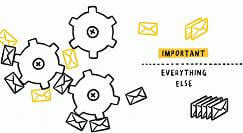
Priority Inbox learns which emails are important enough for you to read.

Google announced Monday that it would be rolling out a new email sorting feature for its 170+ million Gmail users. The “Priority Inbox” allows you to train Gmail how to rate incoming email according to its importance. Those messages that you actually need to pay attention to are bubbled up to the top so that you can find them easily. According to Google, Priority Inbox judges the importance of emails by monitoring which types of emails you regularly read and which you reply to. You can also individually mark the importance of an email through plus and minus buttons or set up filters to automatically mark messages for you. Along with Gmail’s evaluation of spam (which is quite good), Priority Inbox has the potential to manage even the worst email overload. Watch Google’s cutesy ad for the beta product below. I think programs like Priority Inbox are the key ingredients in the next generation of artificial intelligence enabled personal assistants.

When AI personal assistants were discussed in commercials in the 90s, companies predicted that they would be able to do almost anything: pay your bills, drive your car, defeat your enemies with real kung-fu grip, etc. While our current generation of AI assistants has yet to reach these lofty goals, they have become very adept at one function: relating your commands to other programs. Google’s new Voice Actions for Android Phones, and Apple’s newly aquired Siri for iPhones, let you speak commands and rely on the assistant to manage other applications to get the job done. In short, our AI assistants have become fledgling middle managers, handling our outbound requests. Priority Inbox, however, displays an example of another important quality of a personal assistant – the ability to manage inbound information.

Priority Inbox is probably very low on the AI food chain. It’s little more than a smart filter than can learn. Yet that sort of ground-level information management is an essential part of what we will want AI assistants to accomplish. We’re are going to be flooded with incoming information as billions of people around the world jump online in the next few decades and begin to rely more and more on electronic communication. Which phone calls will you answer? Which Facebook friends do you really want to stay in contact with? Which news feeds will you actually need to read? AI personal assistants will be able to manage this information with simple filtering, allowing these data streams to enhance your experience rather than overwhelm it.

gmail-priority-inbox

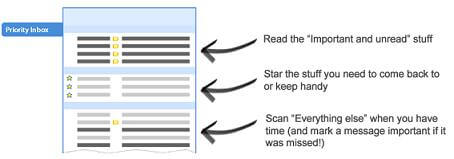
Priority Inbox automatically sorts incoming emails into different sections, while still allowing you to control which stick around for easy referencing.

Google has already discussed other data management AI projects (Big Query and the Prediction API) that will allow companies to apply even better analysis to the information they gather. These programs are part of the same basic ecosystem – they manage incoming data so that you know what’s important, and what actions are most profitable to take next.

I think what we’re seeing is the slow formation of the two paradigms that will constitute the next generation of wide spread AI. We’ll want learning programs to manage incoming data, and we’ll want them to translate our commands into outgoing actions. These narrow applications of artificial intelligence are pretty much already here, but they are bound to get better. I don’t look into my spam folder anymore, I trust Gmail’s filters enough that I don’t feel like I have to double check them. With sufficient training, I’m sure I’ll end up trusting Priority Inbox in the same way. Eventually we’ll have analogous programs for all forms of digital communication: calls, txts, news feeds, etc. I’m slowly getting Siri to where it understands my commands well enough that I don’t double check it for some tasks. Eventually personal assistants will be trusted to manage all our mundane digital requests. If you told me fifteen years ago that I would be happy to have a virtual assistant that told me what information was important, and managed all my commands to other programs, I would have assumed that the world have been taken over by machines and that I was being doped with soma. Now I think such programs would not only be a welcome addition to our digital world, I believe they are halfway here.

[image and video credits: Google]
[source: Google Blog, Google Help]


Related Stories


Connect With Us

.

Post a Comment

Sort By:

Comments

  • User Picture

    That is a great feature to GMAIL…

  • User Picture

    That is a great feature to GMAIL…

  • User Picture

    *Sigh* Another way for Google to track what you do and who you speak to. I really don’t like this advancement of cloud computing, where all your data is held online by companies which are constantly sifting it for targeted advertising and who knows what else.

    I really wish there was more of a focus on personal AI, resident on your device, designed to act as a gateway to unmonitored and unfiltered online content. If a computer programme is going to be sifting through my personal emails, I want it to do so in a secure environment which I have complete control over.

  • User Picture

    *Sigh* Another way for Google to track what you do and who you speak to. I really don’t like this advancement of cloud computing, where all your data is held online by companies which are constantly sifting it for targeted advertising and who knows what else.

    I really wish there was more of a focus on personal AI, resident on your device, designed to act as a gateway to unmonitored and unfiltered online content. If a computer programme is going to be sifting through my personal emails, I want it to do so in a secure environment which I have complete control over.

  • User Picture

    It’s an amazing feature! I use another cool Email management solution Taroby http://www.taroby.com for managing my business email accounts. The software lets me prioritize and sort relevant emails and thus helps in tackling inbox overload.

  • User Picture

    It’s an amazing feature! I use another cool Email management solution Taroby http://www.taroby.com for managing my business email accounts. The software lets me prioritize and sort relevant emails and thus helps in tackling inbox overload.

  • User Picture

    I think that this is adequate as far as social emailing goes. My own inbox is easily self-manageable due to the fact that I’m low on the social ladder I have my core group of friends, mostly since high school. A few from work, and that’s it! Anybody else I follow on Facebook or elsewhere really don’t need my e-mail. So any spam I get is easily manageable. I know exactly what new email senders to expect, so I watch the filter for that. Anything else is trashed daily. Half the problem people have is that they keep all their emails from years ago! Why? Too much to sort through means that you really need an AI to tell you whats important.

    • User Picture

      The archival of email messages means more to me than more stuff to sort through and organize. It’s more of a time machine that allows me to look back at that moment in life and see what was going on for me. Blogging only lets me see what I decided to publish, usually more constrained than email because we’re more likely to be open with friends and family than we are through a public medium.

      I love Gmail for being able to hold onto everything and keep it in a threaded conversation. Priority Inbox is a great improvement, too.

  • User Picture

    I think that this is adequate as far as social emailing goes. My own inbox is easily self-manageable due to the fact that I’m low on the social ladder I have my core group of friends, mostly since high school. A few from work, and that’s it! Anybody else I follow on Facebook or elsewhere really don’t need my e-mail. So any spam I get is easily manageable. I know exactly what new email senders to expect, so I watch the filter for that. Anything else is trashed daily. Half the problem people have is that they keep all their emails from years ago! Why? Too much to sort through means that you really need an AI to tell you whats important.

    • User Picture

      The archival of email messages means more to me than more stuff to sort through and organize. It’s more of a time machine that allows me to look back at that moment in life and see what was going on for me. Blogging only lets me see what I decided to publish, usually more constrained than email because we’re more likely to be open with friends and family than we are through a public medium.

      I love Gmail for being able to hold onto everything and keep it in a threaded conversation. Priority Inbox is a great improvement, too.

Get Our Newsletter

Popular On The Hub

Singularity

Martin Ford Asks: Will Automation Lead to Economic Collapse?

Written by: Aaron Saenz 716 days ago

lights-in-the-tunnel

Will the future be filled with cool technologies and endless opportunities or will our own creations lead to eventual doom? [...]

Robots

5 Axis Robot Carves Metal Like Butter (Video)

Written by: Aaron Saenz 605 days ago

metal-helmet-machine

Industrial robots are getting precise enough that they’re less like dumb machines and more like automated sculptors producing artwork. Case [...]

Genetics

Designer Babies – Like It Or Not, Here They Come

Written by: Keith Kleiner 1009 days ago

designer-babies

Long before Watson and Crick famously uncovered the structure of DNA in 1953, people envisioned with both horror and hope [...]

Stem Cells, Gadgets, Robots, Longevity, Health, Artificial Intelligence, Genetics, Body Implants, Cyborgs, Science, Technology, Singularity, The Future!